VBA – Access – Export a table in HTML and other tricks
After showing some tricks for VBA MS Access, I have decided to go back to the field again to find a way to export a table in HTML format. Actually, VBA and Microsoft have taken care of the issue (no irony here) and have provided a cool feature exactly for this. Pretty much, the code is one line only and looks like this:
Sub btn_export_click()
DoCmd.OutputTo acOutputReport, "Football_Clubs_Report", acFormatHTML, "Club.htm", True
End Sub
Furthermore, the “TRUE” at the end of the second line means that the table is going to be opened in the default browser. So, I took some Access tables from other examples and I have decided to make it a little more interesting. The table I used is this one:
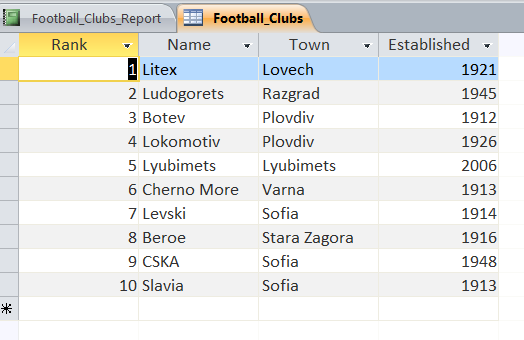
After running this one line code, in HTML it looks like this:

And in order to make the whole article better, I have decided to associate the command to a button, thus making some kind of user friendly MS Access application. The user friendly application has two more options – it selects some football teams, established after 1940 and it also selects a team called “Beroe”. So, considering that 3 small macros is enough for today I have decided to write them down here.
This is how the user friendly MS Access looks:

Here is the code for the selection of “Beroe”:
Sub btn_beroe_click()
    DoCmd.OpenTable "Football_Clubs", acViewNormal
    DoCmd.FindRecord "Beroe", acEntire, True, acSearchAll, True, acAll
End Sub
Here is the code for the selection of the teams, established after 1940:
Sub btn_select_Click()
   DoCmd.OpenTable "Football_Clubs", acViewNormal
   DoCmd.ApplyFilter "Established", "Established > 1940"
End Sub
If for any reason you want to test the MS Access application, you may do it here.