VBA – Probability Simulation of Two Dice
Throwing dices used to be a way to gamble. Nowadays, with TexasHoldEm all over the internet, this game is forgotten 🙂 Probably for good. Anyway, at the beginning of statistics every student is required to resolve some problems, containing dice, cards or even roulette. Combinatorics was interesting at that time. And it shows why the gambling is really a profitable business for those, who organize it.

So, everyone studying at least an hour of statistics, would be capable to come up with a similar table of probabilities for two dice:
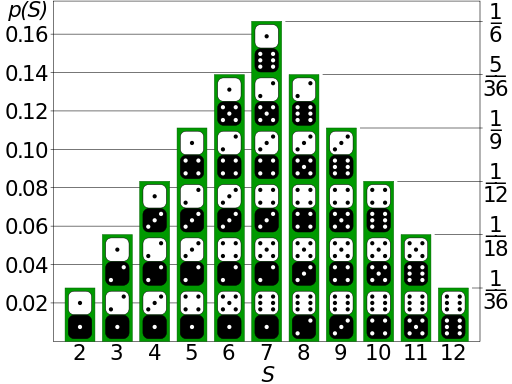
Using this table as an input, I will build a probability simulation in VBA, in order to test it 🙂 Thus, as an input of my routine I will set the number of tests and as output I will provide the real results from the tests vs. the expected result and the difference. Pretty much something like this:

The above picture shows the results of 60 tests. We may see, that there is some difference between the expected result and the real ones. Would this difference decrease with the increase of the number of tests? The statisticians would answer without any doubt – YES. Is this the case? See for yourself and pay attention to the third column:

Last but not least – here comes the code:
Option Explicit

Sub CalculateDiceSimulation(lTests As Long)

    Dim ExpectedOutput(10)  As Double
    Dim RealOutput(10)      As Integer
    Dim iPositionInArray    As Integer
    Dim i                   As Long
    Dim sResult             As String

    Dim dReal               As Double
    Dim dExpected           As Double
    Dim dDifference         As Double

    ExpectedOutput(0) = 1 / 36
    ExpectedOutput(1) = 2 / 36
    ExpectedOutput(2) = 3 / 36
    ExpectedOutput(3) = 4 / 36
    ExpectedOutput(4) = 5 / 36
    ExpectedOutput(5) = 6 / 36
    ExpectedOutput(6) = 5 / 36
    ExpectedOutput(7) = 4 / 36
    ExpectedOutput(8) = 3 / 36
    ExpectedOutput(9) = 2 / 36
    ExpectedOutput(10) = 1 / 36

    For i = 1 To lTests
        'We need to take into account that the 0 index should be used for the case, when
        'the dices return a result of 2:
        iPositionInArray = CalculateTwoRandoms - 2
        RealOutput(iPositionInArray) = RealOutput(iPositionInArray) + 1
    Next i

    sResult = "Number" & vbTab & "Expected" & vbTab & "Real" & vbTab & vbTab & "Difference"

    For i = 0 To 10
        dReal = ExpectedOutput(i)
        dExpected = RealOutput(i) / lTests
        dDifference = Abs(ExpectedOutput(i) - RealOutput(i) / lTests)
        sResult = sResult & vbCrLf & i + 2 & vbTab & vbTab & FormatPercent(dReal, 2) & vbTab & vbTab & FormatPercent(dExpected, 2) & vbTab & vbTab & FormatPercent(dDifference, 2)

    Next i

    Debug.Print sResult

End Sub

Function CalculateTwoRandoms() As Integer

    Dim iDiceA As Integer
    Dim iDiceB As Integer

    iDiceA = Int((6 - 1 + 1) * Rnd + 1)
    iDiceB = Int((6 - 1 + 1) * Rnd + 1)

    CalculateTwoRandoms = iDiceA + iDiceB

End Function
Thank you for your attention! 🙂