VB .NET Just Another ToDo App with VitoshAcademy
So far in VitoshAcademy I have done the following ToDo apps:
- To Do with AngularJS
- To Do with PHP
- To Do with Python & Django
It is not because I really have so much to do, but I really like the To Do example, when it comes to getting acquainted to some technology. If I can do the CRUD model, then it puts me on one level further in that technology. Or at least I tend to think so 🙂 Thus, now it is time for VB .Net.
This is how my To Do app looks like:
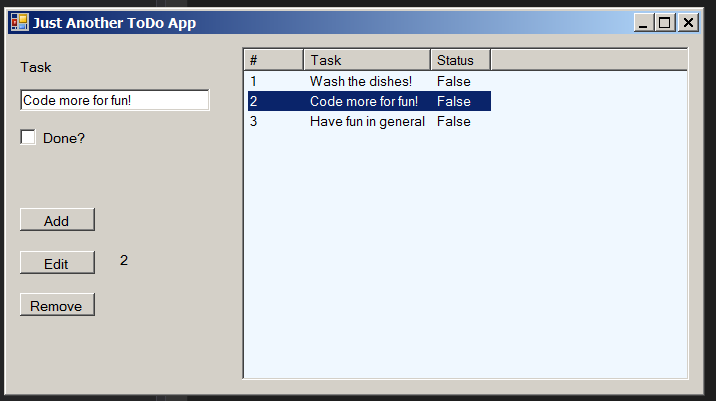
You may enter the task by writing in the text box below “Task” and if you want to edit it, then select it from the listview on the right and simply change it. Once you are ready, press “Edit”. You would get update with the count of the edited items and the item would be updated on the right side. No database is used in this small model.

Easy and nice. At least I liked it, because I managed to finish it quite fast and I got what I wanted to get. 🙂
That’s all. The code is below:
Public Class FormMain
    Private objListBox As CToDoList
    Private p_counter As Long

    Private Sub FormMain_Load(sender As Object, e As EventArgs) Handles MyBase.Load

        objListBox = New CToDoList(lv, "#", "Task", "Status")

    End Sub

    Private Sub btn_add_Click(sender As Object, e As EventArgs) Handles btn_add.Click

        objListBox.Addition(tb_task.Text, cb_status.Checked)

    End Sub

    Private Sub btn_remove_Click(sender As Object, e As EventArgs) Handles btn_remove.Click

        objListBox.RemoveSelected()

    End Sub

    Private Sub btn_edit_Click(sender As Object, e As EventArgs) Handles btn_edit.Click

        objListBox.Fix(tb_task.Text, cb_status.Checked)
        p_counter += 1
        lbl_update.Text = "Updated " & p_counter

    End Sub

    Private Sub lv_SelectedIndexChanged(sender As Object, e As EventArgs) Handles lv.SelectedIndexChanged

        If objListBox.check_selection Then Exit Sub
        cb_status.Checked = objListBox.get_status
        tb_task.Text = objListBox.get_task
        lbl_row_to_edit.Text = objListBox.get_number
    End Sub

End Class
Public Class FormMain
  Private objListBox As CToDoList
  Private p_counter As Long

  Private Sub FormMain_Load(sender As Object, e As EventArgs) Handles MyBase.Load
    objListBox = New CToDoList(lv, "#", "Task", "Status")
  End Sub

  Private Sub btn_add_Click(sender As Object, e As EventArgs) Handles btn_add.Click
    objListBox.Addition(tb_task.Text, cb_status.Checked)
  End Sub

  Private Sub btn_remove_Click(sender As Object, e As EventArgs) Handles btn_remove.Click
    objListBox.RemoveSelected()
  End Sub

  Private Sub btn_edit_Click(sender As Object, e As EventArgs) Handles btn_edit.Click
    objListBox.Fix(tb_task.Text, cb_status.Checked)
    p_counter += 1
    lbl_update.Text = "Updated " & p_counter
  End Sub

  Private Sub lv_SelectedIndexChanged(sender As Object, e As EventArgs) Handles lv.SelectedIndexChanged
    If objListBox.check_selection Then Exit Sub
    cb_status.Checked = objListBox.get_status
    tb_task.Text = objListBox.get_task
    lbl_row_to_edit.Text = objListBox.get_number
  End Sub
End Class