VBA – Add a C# library to a VBA project – Part 2
After writing the simple part here I think that it is a really good idea to introduce IntelliSense as well 🙂
Something like this in the code:
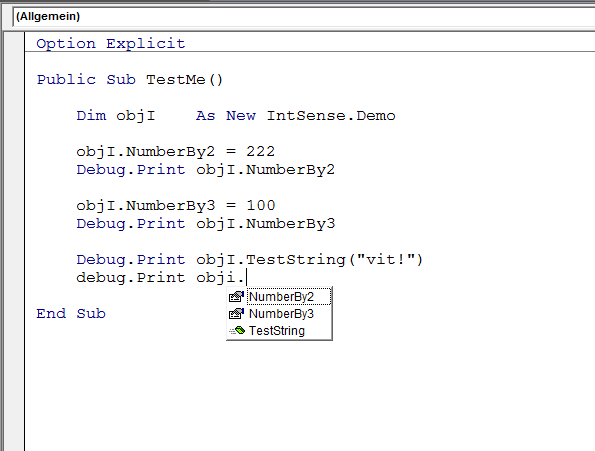
And like this is in the library:

The question is always one – how? The answer in this case was a bit unexpected for me – through Interfaces in C#. They take up the responsibility for IntelliSense and work pretty well.
Thus, the following code does the magic:
using System;
using System.Runtime.InteropServices;

namespace IntDemo
{
    [InterfaceType(ComInterfaceType.InterfaceIsIDispatch)]

    public interface IIntellisenseDemo
    {
        int NumberBy3 { get; set; }
        int NumberBy2 { get; set; }
        string TestString(string name);
    }
}
The whole project (including the funny VBA code from the first screenshot and the strange C# class) is available in my GitHub repo here.